

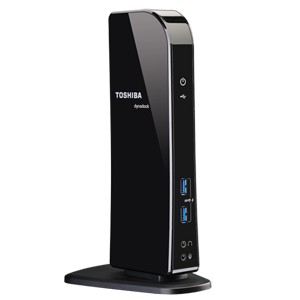
PA3927U-1PRP

Toshiba dynadock® U3.0 Universal USB 3.0 Docking Station

Connect to all your computer devices with one USB cable quickly and easily!

MSRP: $161.99
Shop Online
Toshiba dynadock® U3.0 Universal USB 3.0 Docking Station 2.71 out of 5.0 based on 41 user reviews. Average Customer Rating: 2.71 out of 5.0
Read Reviews (41)  | Write Reviews

Docking and Stands - PA3927U-1PRP Customer Reviews

Very Unstable and Poor Display

POSTED BY: , Mountain View, CA
Overall rating: 1.0 out of 5

"It is a chore to get it running, not a plug and play. Still has a clutter of wires on the workspace. Even after you get it installed, there are many problems. I have had it for almost a year. My latest one will get me to dump this device. The HDMI out to the monitor is very unstable. I went to Displaylink web site and tried everything. The monitor becomes blurry for 4-5 minutes at a time and then becomes better. Good idea, poor execution. Poor Price to Value. Do not recommend this at any price."

Flawless

POSTED BY: , Nor Cal
Overall rating: 5.0 out of 5

"Takes some tech savy adjustment....with sound, video and drivers, but once it's set up it works flawlessly. Very impressed with performance. Have had it for over a year."

No other word but - Rubbish

POSTED BY: , Gilbert, AZ
Overall rating: 1.0 out of 5

"I got my wife a Toshiba Laptop for Christmas. It was a pain to unplug all of the devices (mouse, second screen, CAT5, etc.) when she wanted to take the laptop around the house. Late February I bought her a Dynadock U3.0 - not the cheapest but I thought that it had to be good quality since it was pitched by Toshiba. Well since we installed it we have had nothing but problems. From not being able to find and install the drivers, to loosing network connection on a regular basis, and loosing connection to devices. Today I decided to remove and trash the Dynadock U3.0. The Toshiba laptop is still working, but maybe our next laptop will not be from a company with "T" in its name."

Dynadock USB 3.0

POSTED BY: , Frisco, TX
Overall rating: 1.0 out of 5

"I ordered a Dynadock USB 3.0 for my Toshiba C650 laptop. After some back and forth I got it running - I connected it to a SAMSUNG VGA monitor to check out the Dynadock before I would get a new LCD monitor with HDMI etc. I shut down the laptop, and the next morning when I booted up the laptop, I had no external display - dark. I disconnected the DD and monitor from the laptop and restarted it. It froze up at the first attempt to open a file. It would not allow access to the Task Manager nor allow a shutdown. I forced the shutdown and rebooted it. I got a message that Windows had encountered a major problem and the recommendation to repair it. After almost 30 minutes, the recovery to an earlier boot-up point was done, the laptop worked fine again. I uninstalled the DD driver. The monitor is no longer working, regardless whether I connect it to the laptop directly or to the PC. Lesson learned: I should have believed the one and two star comments and not ordered the device. The request for an RMA is being processed."

Nice idea that fails

POSTED BY: , Houston, TX
Overall rating: 1.0 out of 5

"When I first installed the device about 6mo ago, everything worked fine; DVI port, Ethernet, speakers, USB drives, etc. The some software/firmware upgrade comes along on my system and it locks up with the DVI port in use. After several hours, I got everything working by plugging my monitor directly into the VGA port of the laptop. A few more months have passed and another software/firmware happened on the system and it locked up with the DD connected in any manner. Got the machine working w/o the DD but it locked up again as soon as it completed docking; laptop and external monitor screens both go dark and remember, external monitor not even hocked to DD. This time fix is permanent; DD is in the trash."

Flawless performance

POSTED BY: , US
Overall rating: 5.0 out of 5

"Initially hesitant bcoz of negative reviews here and on a couple other sites. I went ahead and bought this model December 14, 2012. While there may have been firmware issues in the past, I have had absolutely none. Several issues that others have complained about lead me to believe that they did not do the initial instal correctly. The manual very clearly states to NOT plug in the usb to computer cable till after instal software (drivers) have been installed. It is essential that you follow those directions to the letter. I installed mine to a Toshiba L675D-S7046 connected to a Samsung 27" display per Toshiba Dock directions... worked flawless. A couple weeks later I shut down everything and unplugged the dock from the ac and the usb connection. I removed the drivers and install package from the laptop and then started "new" instal by 1st plugging in the USB to computer and then booting windows. Immediately had issues getting windows 7 to boot, finally got windows to boot and it (windows) recognized new hardware and started the windows 7 install wizard. I had more issues than time to go into... failure to transfer desktop to external monitor, usb ports on dock not working / not recognizing plugged in devices and then all of a sudden working fine. Resolution settings not holding to my setting. So I am convinced that you MUST do the install exactly as Toshiba outlines. I went back, stripped the bad install off and re-did the install according to Toshiba's manual... word for word, and have had no issues, not one single issue. Currently running same laptop, WD passport drive, numerous other small drives, external monitor, HDMI connection to my TV, a tablet and phone also charge. I hot swap without a 2nd thought. It's been a great investment and made my workspace and entertainment system much more unified and clean. +1 all the way."

Simplified replacing my Desktop using my Laptop

POSTED BY: , Columbus, Ohio
Overall rating: 5.0 out of 5

"Using my Lenovo Yoga 13 with WIndows 8 single cable USB 3.0 to run: DVI Monitor, USB Ext. Harddrive, Ext. DVD drive, 1Gig network, Android Phone sync, APC power UPS monitoring, Keyboard/Mouse, and speakers. Typically Boot Up/Down upon connecting to avoid issues. With Win8 Boot is Instantaneous. Love the single cable to connect with all devices."

Not as nice as a conventional docking station

POSTED BY: , Weston, FL
Overall rating: 3.0 out of 5

"The pros of this upright dock are the number of and access to connectors. I wish there were more! However, that's the last pro, and also a problem because all those wires really drive the positioning of the unit - they're all stiff and the unit is relatively light. As a result, you end up with a bit of a tangle at the unit and it can't easily be moved or turned. Also, the unit generates a TON of radio interference for Logitec and Microsoft wireless mouse/keyboards. The Toshiba wireless mouse/keyboard works flawlessly, so somebody there is aware of this issue and fixed it, but the Toshiba keyboard and mouse I received are something less than full size so I'd rather use another product. After a month of frustration and buying different mouse/keyboards (and BTW tech support was of NO help on this) I found that moving the USB connector between my laptop and the dynadock to the far side of my laptop and the USB mouse/keyboard wireless connector closer the issue "went away." So here's the biggest problem - I still have to connect laptop power, the dynadock USB and the mouse/keyboard USB in the morning and remove them in the evening... yes, it's only three but a conventional dock requires NO plugging and unplugging, and there is no wasted space around the laptop and dock necessary to do that plugging and unplugging. This product wastes a lot of desk space, increase tangle, and is much less convenient than a conventional dock. I wouldn't do it again."

virtual perfect

POSTED BY: , Hamburg, Germany
Overall rating: 5.0 out of 5

"- good graphics for business and multimedia (not games) - good audio features with front and rear ports - good usb and network performance. Its installed to windows nearly invisible (no tools needed) and works flawlessly. No driver issues, no problems with shutting down and standby or so. (win7-64 notebook) I would like an integrated a/c adapter instead of an external one and some more cables. Could be little more slender to enhance portability. Nearly perfect product for a very reasonable price (in comparison to classic docking-stations)."

One cable not true

POSTED BY: , London
Overall rating: 4.0 out of 5

"What a shame it doesn't quite live up to the one cable billing - it still requires the power lead to the laptop. If that had been sorted this would be really good."

MSRP: Reseller/Retailer pricing may vary. Toshiba is not liable for pricing errors.

Computers »

Laptops
Satellite®
Tecra®
Qosmio®
KIRA
Portégé®
Customizable Laptops
Desktops
All-in-One Desktops
Need Help Choosing A PC?
Laptop Finder
Desktop Finder
Computer Research Center
Hard Drives and Storage
Canvio Personal Cloud
Canvio Desk External Drives
Portable External Drives
Flash Storage
Internal Storage
Storage Finder
Accessories
dynadock®
Mobile Monitor
See All Accessories

Tablets »

Excite™ Tablets
Tablet Accessories
Tablet Finder

Televisions »

Cloud Televisions
LED Televisions
Shop Big Screen Televisions
Shop All Televisions
TV Accessories
Need Help Choosing A TV?
TV Finder
TV Research Center

Video & Electronics »

Disc Players
Audio for Video
Camcorders
Electronics Accessories

Support »

Product Support
Drivers & Updates
Community Forum
Repair & Parts
Troubleshooting Assistant
How-to Videos & Articles
Warranty Information
Register My Product
Contact Toshiba Support
Partner Resources
Connect with us
Connect with us on Facebook Connect with us on Twitter Connect with us on YouTube